Every automation needs a name attached to it before it goes live
Internal tooling rarely fails loudly. It fails by succeeding at nothing, for a fortnight, while the person who wrote it works somewhere else.
Somebody builds a small script during a project. It reads a supplier feed, matches it against the warehouse table, and writes the mismatches to a file that the operations team checks each morning. It works. It saves an hour a day, every day, and it was never a project in its own right, so it never got a line in any document.
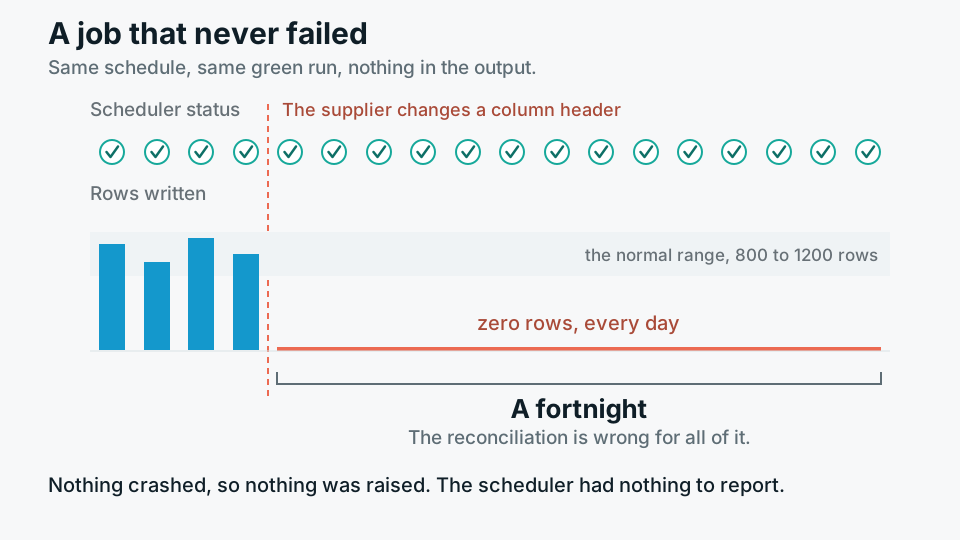
Then the person who wrote it moves to another team. Some months later the supplier changes a column header. The script keeps running on schedule, matches nothing, and writes an empty mismatch file. An empty mismatch file looks exactly like a good day. By the time anyone notices, the reconciliation has been wrong for a fortnight, and the work is no longer a fix, it is an investigation.
This is the most common way internal automation fails, and it has very little to do with code quality. The script was fine. What was missing was a name attached to it.
Silence is the dangerous output
Automations that crash are the easy case. A crash produces a stack trace, a red run in the scheduler, and usually an email to somebody. The hard case is the automation that succeeds at doing nothing. Zero rows processed. An API returning an empty page instead of an error. A join that quietly stops matching because a key format changed upstream. All of these exit cleanly, and a scheduler will happily report green.
Retries make this worse rather than better. A job configured with three retries and a generous timeout will paper over an upstream service that has become unreliable, so the only signal anyone gets is that the run takes longer than it used to, which nobody is watching. Orchestration is not ownership. Airflow and Dagster will tell you a task ran; they will not tell you whether the output was worth having, unless somebody sat down and defined what worth having means for that particular job.
An empty exceptions file looks exactly like a good day.
The pattern, stated plainly
What an owner actually is
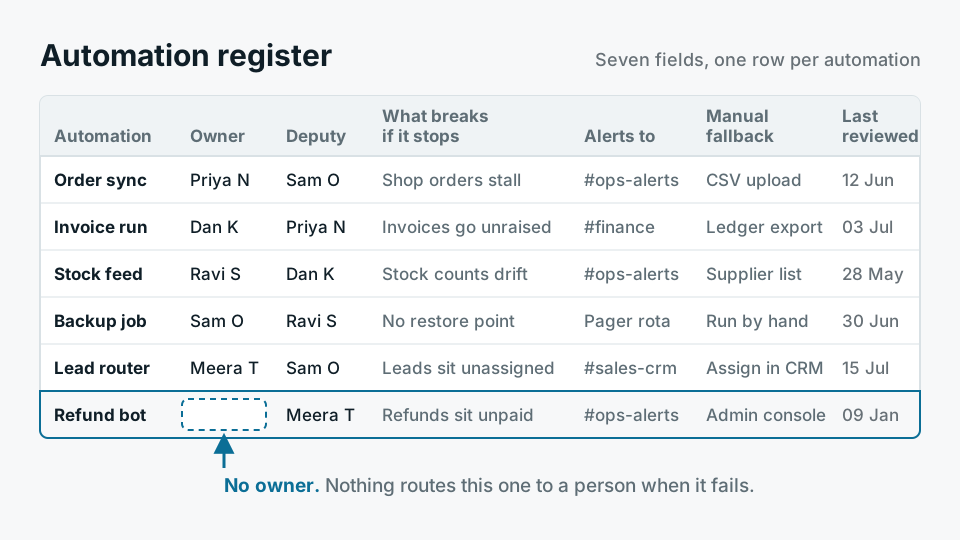
An owner is not the person who wrote it. Authorship is a historical fact and it decays. An owner is a currently employed, currently named person who has agreed, out loud, to three things: that they will be contacted when it breaks, that they can describe what the automation is for in one sentence, and that they have the standing to decide it should be switched off.
That last one matters more than it sounds. Most orphaned internal tools are orphaned not because nobody could fix them but because nobody felt entitled to kill them. So they sit there, running, consuming compute and credibility, and every so often producing an answer somebody acts on.
- A named individual, not a team Team ownership is nobody's ownership. A team inbox absorbs alerts without anyone feeling addressed. Name a person and name their deputy.
- Recorded somewhere queryable A Postgres table or a page in the internal wiki is fine. What is not fine is the knowledge living only in the head of whoever set it up.
- Attached to the job, not to the documentation Put the owner in the DAG's tags or owner field so it travels with the code and shows up in the scheduler UI when something goes red.
- Reviewed when people move Ownership should be part of a handover checklist in the same way that access and on-call rota are.
Alerting that reaches a human
Most internal automation does have alerting. It is usually pointed at a channel that was created for the project, was busy for six weeks, and has been on mute in everyone's client since. The alert fires, the channel goes bold for one person who left, and the tree falls in the forest.
Alerts also need to fire on the absence of things. If a job normally writes between eight hundred and twelve hundred rows, an alert on zero rows is worth more than an alert on failure. If a downstream table normally gets fresh data by seven in the morning, a freshness check on that table catches every upstream cause at once, including the ones you did not anticipate. Lineage helps here: knowing which reports depend on a table tells you how loud the alert should be, and who else needs to hear it.
The fallback has to be written down before it is needed
Every automation replaced a manual process, or it replaced a process that would otherwise have been manual. Write that manual version down at the point of building, while the logic is fresh and while someone still remembers why the edge cases exist. Two paragraphs and a query is usually enough. It does not need to be efficient, because it will be used four times in five years, under pressure, by somebody who did not build the thing.
The reason to write it early is that the moment you need a fallback is the worst possible moment to design one. Month end, a stuck feed, a finance team waiting, and an engineer reverse engineering their predecessor's intent from a SQL file. A documented fallback also has a second use: it forces you to state what the automation is actually responsible for, which is often the first time anyone has done so.
Retire on a schedule, not on discovery
Internal tooling accumulates. Nothing in the ordinary run of work removes it, because removal has a small risk and no visible reward. So it has to be scheduled, in the same way that dependency upgrades have to be scheduled. Once or twice a year, walk the register.
- 01InventoryList every scheduled job, script and integration that runs without a person starting it. Include the ones on somebody's laptop, especially those.
- 02Check consumption, not executionFor each output, find out when it was last read. A dashboard with no views in six months and a table with no downstream queries are the same finding.
- 03Confirm the owner is still realContact the named person. If they no longer recognise the job, it has no owner, whatever the register says.
- 04Decide, and record the decisionKeep, hand over, or switch off. Switching off means disabling first and deleting later, with a date on the deletion so it actually happens.
If no one will own it, that is an answer
The uncomfortable version of this argument is that ownership is a build criterion, not a deployment step. If you cannot find a person who will take the pager for a piece of automation, you have learned something real: that the work it saves is worth less than the attention it costs. Building it anyway does not create value, it creates a liability with a delayed fuse, and the people who inherit the fuse are rarely the people who lit it.
This applies to us as much as anyone. A short engagement that ships a well-built pipeline into a team with no capacity to operate it is not a good outcome, however good the pipeline is. It is a way of moving work from a consultancy's backlog to a client's, with a delay. Where a client has no operating capacity and no appetite to build one, the honest recommendation is a smaller automation with a wider margin, or a manual process performed weekly by somebody who understands what they are looking at. A person doing a task badly notices when the inputs stop making sense. A script does not.
None of this is technically difficult. It is an owner, an alert that lands in front of a human, a fallback written in advance, and a date in the calendar to ask whether the thing still earns its place. The reason it gets skipped is that all four are cheap to defer and none of them are visible in a demo.