Automation stalls at the human step, so design for the person on leave
Your workflow runs in a second and then waits four days on one approval. The fix is not another tool, it is an age, a queue, a deputy and a stated default.
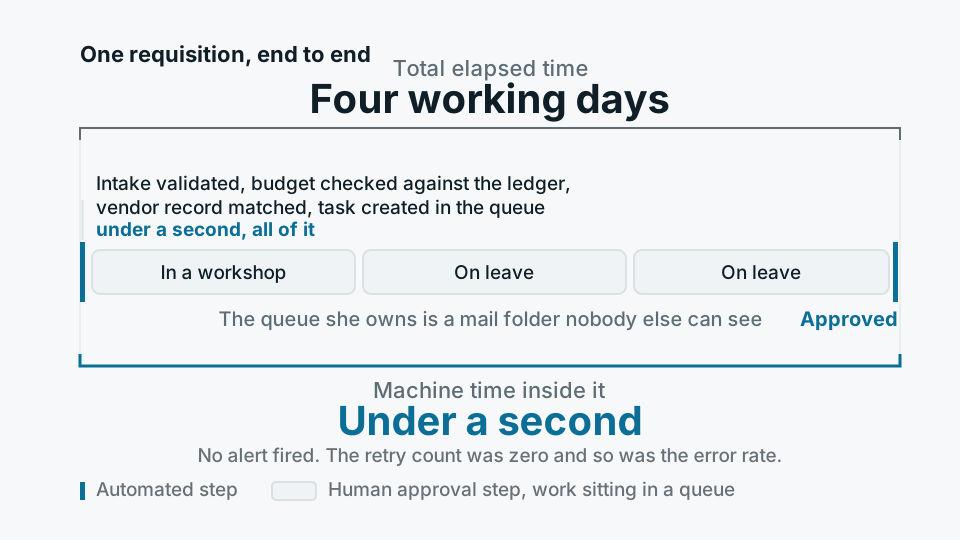
A purchase requisition arrives at half past eight. Intake validates it, the budget check runs against the ledger, the vendor record is matched, a task appears in an approver's queue. That whole sequence takes under a second. The requisition is approved four working days later, because the approver was in a workshop on the Monday and on leave for the two days after that, and the queue she owns is a mail folder that nobody else can see.
No alert fires for any of this. Every automated step succeeded on first attempt. The run history is green, the retry count is zero, the error rate is zero. If you asked the orchestrator how the process was doing, it would tell you, accurately, that it was doing fine. The four days belong to nobody, because the system only measures the parts it controls.
In most automated business processes the throughput number is not the interesting one. The interesting number is the age of the oldest item currently sitting with a person, and most teams cannot produce it on request.
The orchestrator keeps the wrong clock
Airflow and Dagster measure what they run: task duration, success and failure, retries, whether a run finished inside its SLA. A step that waits on a person is usually modelled as a sensor. Poll a table, poll an API, return true when the decision appears. From the scheduler's point of view, a sensor that has been polling for six days is behaving exactly as designed. It is not late. It has no concept of late, because the deadline was never expressed as data. Sensor timeouts do exist, and they are usually set generously so that nothing fails overnight, which turns the one mechanism that could have surfaced the wait into a mechanism that conceals it.
The second reason the wait stays invisible is that the queue is not really a queue. It is an email, or a chat message with a button in it, or a row in a system that only its owner ever opens. There is no single place where you can look and see the forty-one decisions this business is currently waiting on, who owns each one and how old each is. Until that view exists, every conversation about the process runs on anecdote, and the anecdote is always about the one case somebody happened to chase.
Four things every waiting step needs
- An age Every pending decision carries the moment it was created and the moment it is due. Age is the primary metric of that step, not something you reconstruct from logs after somebody complains.
- A queue other people can see Pending work belongs in a shared table with a view over it, not in an individual inbox. If the only way to learn what is outstanding is to ask the person it is outstanding with, the process cannot be managed at all.
- A named deputy Each approver has a second approver defined in advance, with the same authority and a stated point at which the decision becomes theirs. Not a manager to be hunted down during a crisis, a person recorded in the same table as the rule.
- A stated default Write down what happens when nobody acts. Approve, reject, escalate, or stop the run loudly. Every process already has a default. Usually it is wait forever, and usually nobody chose it.
The last of those is the one teams skip, and it governs the other three. Wait forever is a real policy with real consequences: the invoice ages past its early payment discount, the refund becomes a complaint, the batch sits on the floor with its paperwork half finished. Which default is right depends entirely on which direction the mistake hurts, and that is a business question, not an engineering one.
The interesting number is not how fast the process runs. It is the age of the oldest thing waiting on a person.
The pattern, stated plainly
Escalation is a risk decision, not a nag
Most escalation designs turn out to be reminder emails. A reminder is not escalation, because it does not change who is able to act. Escalation means authority moves: after some interval the decision becomes available to a named deputy, then to a role rather than an individual, then finally to the stated default. Each hop belongs in the workflow definition next to the approval itself, and each should be recorded when it fires. That log is the most honest performance data the process will ever produce. If a step escalates more often than it does not, the approver is not the problem. The step is.
Where the state has to live
This is a data modelling problem before it is a tooling problem. One table in Postgres, one row per pending decision: the subject, the run it belongs to, who it is assigned to, who deputises, when it was raised, when it is due, when it escalated, when it was decided and by whom. Every surface reads from that table, including the approval screen, the mobile notification, the morning digest and the operations view. The orchestrator's sensor reads it too, so the machine's picture of what is outstanding and the manager's picture cannot drift apart. After that the rest is ordinary work: ageing is a query, the queue is a view, escalation is a scheduled job comparing a due timestamp to now, and the reporting nobody could produce before falls out of a table you now have.
- 01Find the waitsList every point where the process stops and a person must act. Include the ones held in no system at all, the phone call, the signature, the person who checks something on a screen and tells someone else.
- 02Give each wait a rowPersist pending decisions rather than sending them. The message becomes a notification about a record, and the record is the thing that can be counted, aged and reassigned.
- 03Set the due time and the defaultFor each step agree what is an acceptable wait and what happens once it passes. Put both where the code reads them, not in a policy document that nothing enforces.
- 04Publish the queueOne view of everything outstanding, sorted by age, visible to more people than just the approvers. Visibility on its own removes a surprising share of the delay.
- 05Escalate, then read the escalationsMove authority on a timer, log every hop, and review the pattern monthly. The steps that escalate constantly are your candidates for deletion.
Where this approach is the wrong answer
The failure mode of everything above is that it makes waiting comfortable. Once the queue is visible, ageing is charted and escalation is dependable, an approval that contributes nothing can survive indefinitely, because it is now well managed. We have built careful escalation ladders for steps that should simply have been removed, and the ladder made the argument for removal harder rather than easier, because the step had stopped hurting anyone enough to raise it.
So the first question at any human step is not how to route around the person. It is whether the decision is real. If an approver has refused nothing in a year and cannot describe what they check, that is not an approval, it is a delay with a job title attached. Remove it, or convert it into a notification with a right of veto, which costs nothing and blocks nothing. Automation is very good at making a poor process run quickly, and a control that exists to spread responsibility rather than to catch anything is the most common thing we find sitting in the middle of one.
The person on leave is not the problem to be solved. They will always exist, and next month it will be somebody else, and the month after that it will be two people in the same week. The design question is what the process does on their behalf while they are away, and whether anyone can see that it is doing it.