Building around an ERP you are not allowed to change
The customisation is refused, the upgrade path must stay clean, and the work still has to happen. What survives is a satellite, and a record of who owns each field.
A shift supervisor wanted three extra fields on the batch release screen. The name of the analyst who signed off the quality check, the retest date, and a short note saying which line the deviation came from. None of it was exotic, and the ERP could have held all three without complaint. The answer from the internal team was still no, and the reason given was that the system was frozen for anything that was not a defect fix.
That sounds like bureaucracy protecting itself. Usually it is not. Somebody in that building has lived through an upgrade where a handful of small changes to delivered objects turned into weeks of conflict resolution, regression testing and validation paperwork, and they have decided never to do it again. The freeze is a scar, and the scar is reasonable.
What the freeze does not do is make the work disappear. Those three fields will be captured anyway, in a spreadsheet on a shared drive, or a WhatsApp group, or a notebook next to the packing bench. So the real choice is never between customising the ERP and doing nothing. It is between a satellite application you designed on purpose and a shadow system you inherit by accident.
What the freeze is actually protecting
Be precise about what is being defended, because that determines what you are still allowed to build. The expensive thing is not custom code as such. It is custom code that sits inside the vendor's own objects. Modify a delivered program, drop an include into the middle of standard logic, alter a delivered table, and every future upgrade has to stop and ask a developer what to do with your change. Multiply that by a few hundred and an upgrade stops being a weekend and becomes a project.
Extension points the vendor publishes behave better. Enhancement spots, user exits, key-user field extensions and the newer low-code layers are designed to survive a version change, and mostly they do. They still carry a testing burden and still need scarce platform skills, which is often the real constraint behind the freeze. So the rule that survives contact with a nervous platform team is short. Nothing you build should require a person to open the vendor's code, and nothing you build should be able to stop an upgrade from proceeding. Everything else is negotiable.
The choice is not between customising the ERP and doing nothing. It is between a satellite you designed and a shadow system you inherited.
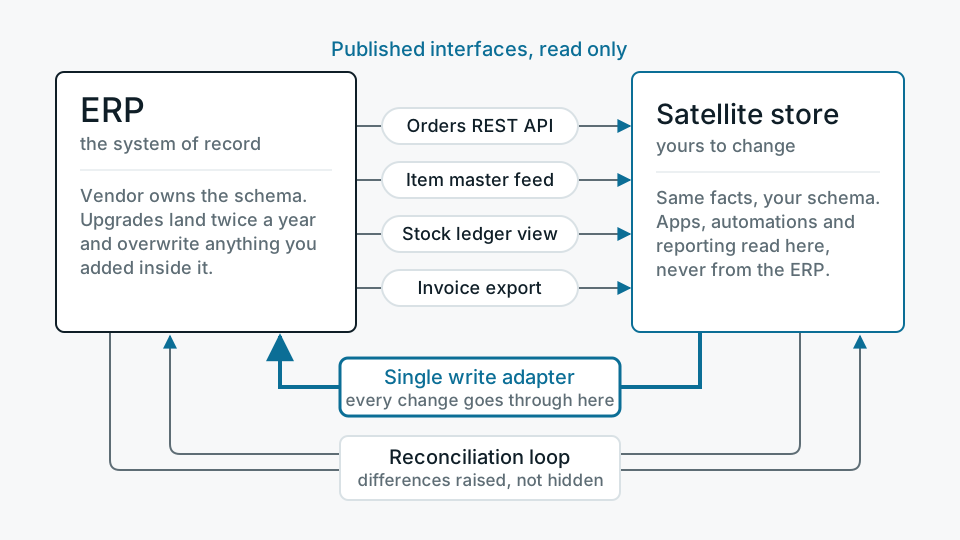
The pattern, stated plainly
Reading is the easy half, and people still get it wrong
The first temptation is to read the ERP database directly. It is quick to build and almost always regretted. A vendor schema is not an interface. Tables carry deletion flags instead of deleting rows, quantities sit beside unit fields that change meaning by material, amounts are stored in a currency whose decimal places are defined somewhere else, and the moment one of your queries slows the transactional system you have no support and no defence. Published interfaces are less convenient and far more durable, because they come with an implicit promise to keep behaving the same way after an upgrade. Pull through those into a store you own, usually a Postgres database in your own environment, and let everything downstream read your copy rather than the ERP.
- Published service interfaces REST and OData endpoints, published views, function modules exposed for remote calls. Contract-bearing and versioned. This is the default.
- Document interfaces IDoc, EDI, scheduled file drops. Old, asynchronous, unfashionable and remarkably stable. Good for volume, poor for a screen that has to feel live.
- Vendor-sanctioned extraction Delta-enabled extractors and the log-based replication the vendor supports for analytics. Cheap on the source system and built for exactly this job.
- Direct table reads Last resort. Read a replica rather than the live instance, isolate it behind one module, and write down that it is unsupported so nobody is surprised later.
However you extract, assume you will miss things. Timestamp-based pulls lose records edited in the same second as your high-water mark. Soft deletes never arrive as deletes. Backdated postings appear behind your cursor. The fix is not cleverer extraction logic, it is a scheduled reconciliation that compares counts and key values over a trailing window and tells you when the two systems have drifted apart.
Writing back is where the pattern earns or loses its money
A satellite that only reads is a reporting tool with extra steps. The value appears when something captured outside returns to the system of record, so the ERP stays the place where the business truth lives. It is also where these projects break, because writes are stateful. A retry that posts a goods movement twice is a stock discrepancy somebody has to count their way out of, not a warning in a log.
- 01Capture locally firstThe satellite records the intent as its own row with its own identifier before anything is sent anywhere. If the ERP is unavailable, work carries on and the queue grows.
- 02Validate against the ERP's rulesCheck that the material exists, the batch is open, the posting period is not closed. Rejecting in your own screen is kinder than a failure buried in a log an hour later.
- 03Post through one adapterEvery write in the system goes through a single module using a supported interface. When the vendor changes something, there is exactly one place to change.
- 04Carry an idempotency key and keep the answerSend a reference the ERP will store and you can query, and record the document number it returns. That number is the only real link between the two systems.
- 05Give failures a human queueSome postings fail for reasons no code can resolve. They need a screen, an owner and a visible age, not a retry loop that quietly gives up after five attempts.
The decision that matters most is written down, not coded
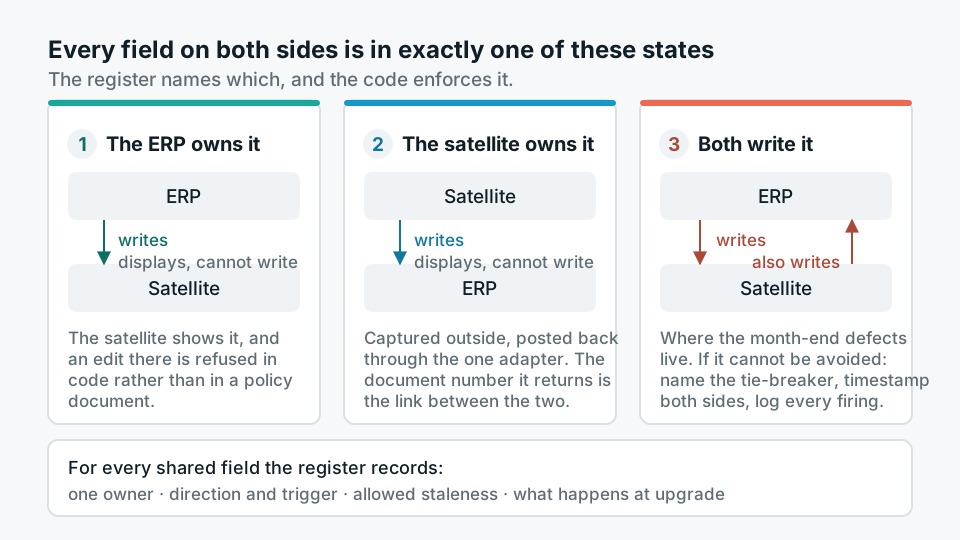
Once a field exists in two systems, somebody will eventually change it in both. The register that prevents this is dull to produce and is the most useful artefact of the whole engagement. For every field present on both sides it records one owner, the direction and trigger of the sync, how stale the copy is allowed to get, and what happens to the field when the ERP is eventually upgraded or replaced. The other system displays that field and is not permitted to write it, and the code enforces that rather than trusting people to remember.
There is a third state people slip into without noticing, where both systems write the same field under different conditions. That is where the ugly defects live, the ones that only surface at month end when two edits land in the wrong order. Sometimes it genuinely cannot be avoided. When it cannot, name the tie-breaker out loud, keep a modification timestamp on both sides, and log every occasion the tie-breaker fires, so you can see how often you are really in that state rather than guessing.
When a satellite is the wrong answer
Two cases, and both are common enough to say plainly. The first is when the capability already exists in the ERP and has simply never been configured, which happens more often than anyone admits, particularly in modules bought as part of a bundle and switched on for nobody. Building alongside a feature you already pay for is an expensive way to avoid a conversation with the platform team. The second is when nobody will own the new application. A satellite needs a backup schedule, an access review, someone who answers when it stops at two in the morning, and a budget line that survives the next cost exercise. Without those it decays into the shadow system it was built to replace, with a better login screen and a false air of officialdom.
If the ERP itself is genuinely being replaced within the year, wait. It usually is not. The three fields the supervisor asked for are still worth having. They now live in a small application with a clear boundary, they carry the batch number that ties them back to the record everyone trusts, and the name of the person who owns each of them sits in a document rather than being implied by a mapping file. The upgrade, when it comes, will not notice that any of it exists. That is the entire design goal.