How to tell whether you need a lakehouse or just a bigger database
Most teams reach for a lakehouse after a dashboard times out. Here is the written test to run first, and the four reasons that genuinely justify the move.
The question almost never arrives on its own. It arrives attached to something that broke. A dashboard that used to load while you fetched a coffee now times out. A month end job that finished overnight is still running at nine in the morning. Somebody senior asks why, and somewhere between that question and the next budget cycle, the answer has quietly become a lakehouse.
Sometimes that is right. More often it is a correct answer to a problem the company does not have yet. A single Postgres or SQL Server instance carries far more analytical load than most teams assume, and when it does fall over, the cause is usually something specific and cheap to fix rather than something structural. Buying a new architecture to fix a missing index is an expensive way to learn that.
There is a test for this. It is boring, which is why it gets skipped, and it costs nothing but an afternoon. Write down the workloads you cannot run today, and next to each one, the reason it fails. Not the symptom. The reason.
The list is the whole exercise
Everything else in this piece is commentary on that list. It has to be written down, because the version people carry in their heads is always vaguer and always more alarming than the real one. Half the entries dissolve the moment somebody is forced to name the table involved.
- 01One line per workloadName the report, query or job. Say who waits for it, how long it takes now, and how long it actually needs to take. If nobody can say what fast enough means, that line is not a requirement yet.
- 02The reason, in mechanical termsA sequential scan over a table with no useful index. A join that spills to disk because work memory is too small. A read blocked behind write locks. A file format the database cannot ingest at all. A query that is perfectly fast but runs sixty times an hour. These are five different problems and only two of them are about size.
- 03Volumes measured, not estimatedRow counts and on-disk size for the tables the workload actually touches, not the size of the whole database. A hundred gigabyte database is often five gigabytes of facts and ninety five gigabytes of history nobody queries.
- 04Who else needs the same tableOne BI tool, or BI plus a Python team plus a model training job plus a monthly extract for an external auditor. This is the column that most often decides the answer, and it is the one people leave blank.
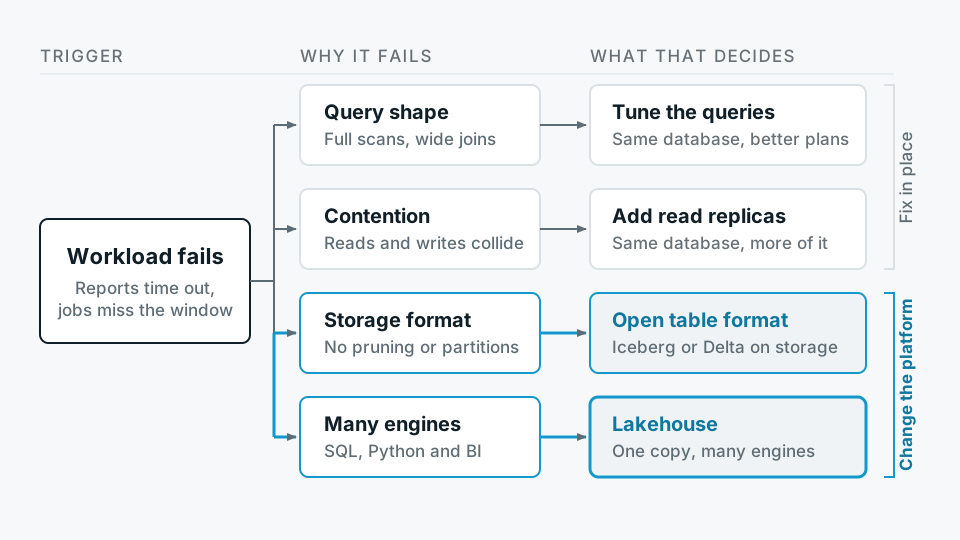
When the list is done it tends to sort itself into three piles. Things that are slow because of how they were written. Things that are slow because one server is doing transactional writes and analytical reads at the same time. And things that cannot be done at all, at any speed, on the system you have. Only the third pile is an architecture question.
If every line on your list says indexing, you have a tuning problem wearing an architecture costume.
The pattern, stated plainly
What one database will do before it gives up
The gap between a stock database and a well tuned one is wider than most vendor comparisons let on, because the comparison is usually drawn against the untuned version. Before you conclude that a single engine is finished, the ordinary moves are worth spending a week on.
- Partition the big fact tables by date Most analytical queries are bounded by time. Partitioning lets the planner skip whole ranges rather than scanning and discarding them.
- Index for the access pattern, not the schema On append-only tables where physical order matches insertion time, a BRIN index costs a fraction of a B-tree and does most of the work. Covering indexes remove trips to the heap entirely.
- Pre-aggregate the things people ask for repeatedly A materialised rollup refreshed on a schedule turns a query that scans a year of rows into one that reads a few thousand. Dashboards rarely need row-level truth, they need a number that is correct as of a known time.
- Separate the readers from the writers A read replica is a modest amount of work and removes the single most common cause of analytical slowness, which is analysts and the application competing for the same buffers and locks.
- Let a local engine do the heavy scan DuckDB reading Parquet files on a single machine handles analytical scans that would embarrass a row store, without any platform migration. It is a legitimate answer for a team of five, and it stays legitimate for longer than people expect.
The four reasons that are genuinely structural
Across the audits we run, the honest justifications reduce to four. Any one of them can carry the decision. None of them is a general feeling that the data is getting big.
- Scan shape, not just volume When queries routinely read a large fraction of a very large table across many columns, a row store is doing the wrong physical work. Columnar storage with statistics per file changes the economics of that scan. Note that this is about how much of the table gets read, not how many rows it holds. Plenty of billion-row tables are queried a thousand rows at a time and are perfectly happy where they are.
- Data that is not relational rows Sensor traces, images, call recordings, documents, semi-structured payloads with a schema that drifts every release. You can force these into a relational database and people do, usually as a text column that nobody can query. Object storage plus a table format is the natural home.
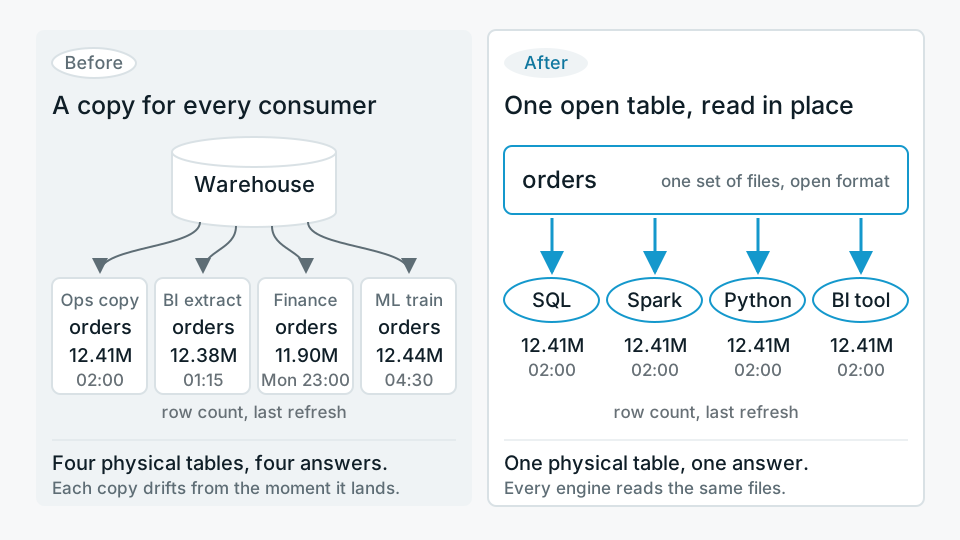
- The number of engines reading the same tables This is the one that decides it most often, and it appears on nobody's business case. When BI, a Python team, a training pipeline and an external extract all need the same definition of an order, either they share one physical table or you maintain four copies that disagree by Thursday. Open table formats exist mainly to solve this, and it is the reason we build our own lakehouse product, Antvia, around Iceberg rather than a proprietary store.
- Storage that has to be cheap and separate If you are keeping seven years of history for statutory reasons and paying for it on the same disks that serve transactional traffic, you are paying database prices for archive data. Separating storage from compute is a cost decision before it is a performance one.
The cost that does not appear in the business case
A lakehouse is not a bigger database with better economics. It is a distributed system that you now operate. Streaming or frequent writes produce many small files, and small files quietly destroy query performance until somebody schedules compaction. Old snapshots accumulate and have to be expired, which means someone has to decide how much time travel the business is actually paying for. The catalogue becomes a new component that everything depends on. Permissions exist in the storage layer and in the query layer, and the two disagree unless you make them agree deliberately.
None of this is hard, but all of it is work, and it lands on a team that previously had one thing to run. Two engineers who know their database well will get more out of a larger instance than the same two engineers will get out of a platform neither of them has operated before. That is not a criticism of the platform, it is arithmetic about attention.
Where we tell people not to buy
If your list has four lines on it, every reason column says indexing or query shape, one BI tool is the only consumer, and the facts fit comfortably on a single machine, then the answer is tuning. We would rather write that in a report than take the platform work, because the platform work would be delivered honestly and would still be the wrong purchase. The clients who come back to us in two years, with a genuine third and fourth consumer of the same tables, are better clients than the ones who bought early and spent the intervening time explaining the bill.
The signal to watch for is not a metric. It is the moment somebody in a meeting says that two numbers are different because they came from different systems, and nobody in the room can say which one is right. At that point you have stopped having a performance problem and started having a definition problem, and definition problems are what a shared table layer is for. Until then, the boring answer holds. Measure the workload, fix the reason, buy the bigger machine, and keep the list.