Access rules that live in the BI tool are not access rules
A row filter configured in a dashboard protects the dashboard. It stops protecting anything the moment a notebook
Row filters in a BI tool work exactly as advertised, right up until the day they do not. A clinician opens the patient dashboard and sees her own unit. A regional analyst opens the same dashboard and sees the sites she covers. Somebody from compliance sits in on a demonstration, watches two people log in and get two different numbers, and signs it off. That is a real control, and for the population of people who only ever touch the dashboard, it is doing real work.
Then the research team asks for a notebook connection to the same warehouse. Or finance wants the figures landing in a spreadsheet every Monday. Or a second BI tool arrives with an acquisition and nobody wants to migrate the reports this quarter. Each of those gets a database credential, because a credential is what you need in order to run a query. None of them goes anywhere near the row filter, because the row filter is a piece of configuration inside an application that is no longer in the path.
The uncomfortable way to say this is that the filter was never protecting the data. It was protecting the report. Those are two different objects with two different sets of ways in, and only one of them is what an auditor will ask you about.
The filter is a WHERE clause, and only one program writes it
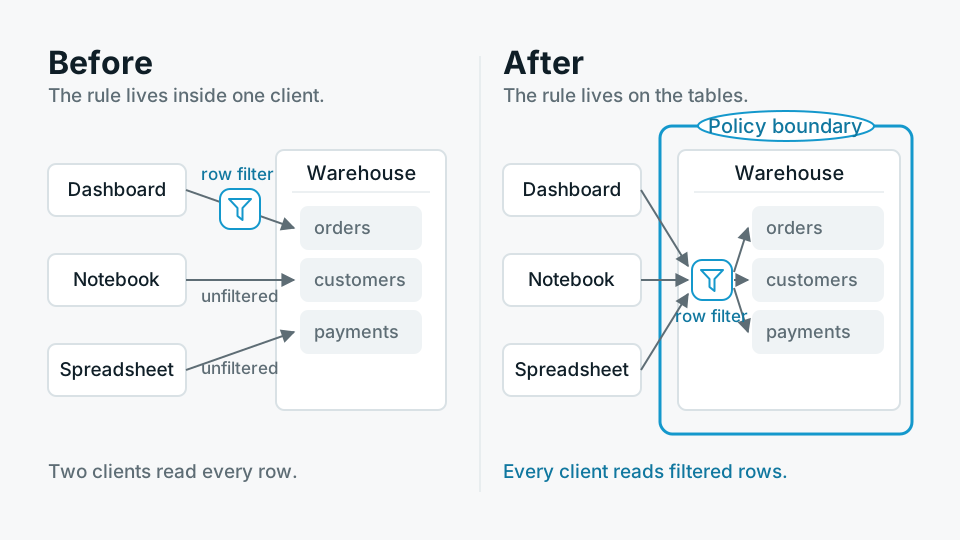
It helps to be concrete about the mechanism. Most BI tools implement row-level security by holding a rule against a user or a group, and appending a predicate to the SQL they generate. The user asks for revenue by month, the tool builds the query, and before it sends it, it adds a condition restricting the rows to the ones that user is allowed to see. Column masking often works the same way, by rewriting the projected column into a case expression or a hash. The enforcement is real. It also lives entirely inside the query generator, which means the edge of the control is the edge of the generator, and anything that reaches the database by another route reaches it unfiltered.
- The SQL editor in the same tool Most BI platforms ship a raw query interface. If a user has that privilege, their hand-written SQL is usually not rewritten, because the tool has no model of what the query means.
- Cached and materialised datasets An extract built by an administrator holds the administrator's view of the data. Everyone who reads the cache reads that view.
- Alerts and scheduled reports These commonly run under the owner's identity and post the result into a channel or an inbox with a different audience.
- Transformation jobs dbt runs, reverse ETL into a CRM, and any pipeline that reads the same tables and writes them somewhere with its own permissions.
- Anything speaking JDBC or ODBC Notebooks, spreadsheets, desktop tools, an engineer with a database client open on the second monitor.
- Copies Replicas, restores, a dump handed to an implementation partner, a lower environment refreshed from production last Tuesday.
The identity problem underneath it
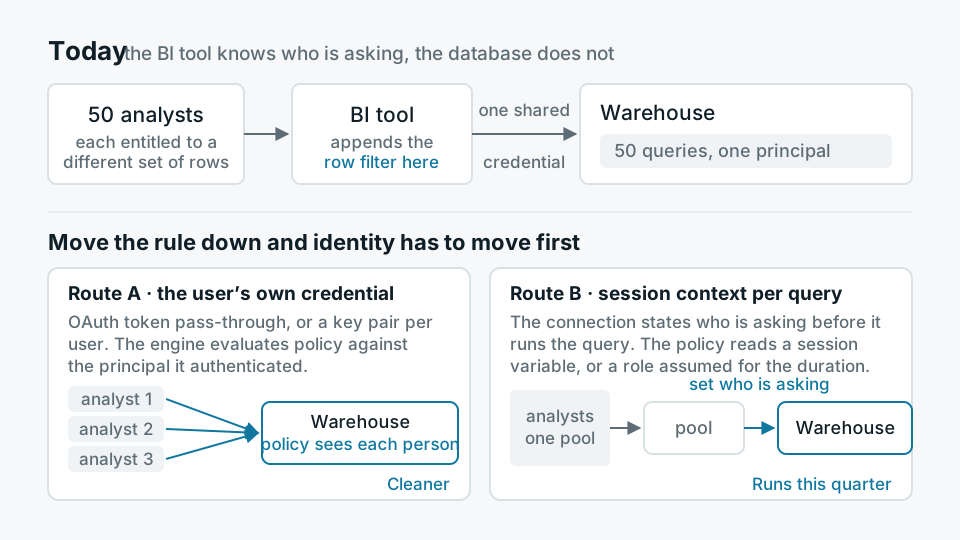
There is a reason the rules ended up in the BI layer, and it is not laziness. Most BI deployments connect to the warehouse with one service account. Fifty analysts log into the dashboard, and the database sees fifty queries from the same user. The BI tool knows who is asking. The database does not. If that is the shape of your connection, the BI tool is the only component with enough information to apply a per-person rule, so of course that is where the rule goes.
Moving enforcement down means fixing identity first. Broadly there are two routes. Either each user's own credential reaches the database, usually through OAuth token pass-through or key pair authentication per user, and the engine evaluates policy against the authenticated principal. Or the connection sets a session context before running the query, so the policy reads the current user from a session variable or a role that was assumed for the duration. Both work. The first is cleaner and the second is often what you can actually get running this quarter.
What enforcement at the query looks like
Every serious engine has a version of this. Postgres has row-level security policies attached to a table, evaluated for any client that touches it, with the caveat that the table owner and any role holding BYPASSRLS are exempt unless you turn on forced row-level security. Snowflake has row access policies and dynamic masking policies bound to the object rather than the consumer, so Snowsight, a JDBC driver and a Spark job all get the same treatment. On a lakehouse, the object store itself has no idea what a row is, so the enforcement point moves up into the catalog and the query engine, which is why the choice of catalog matters more than the choice of file format for this particular problem.
- 01Write down the predicate in wordsA user may read a row when the row's site is in the set of sites assigned to that user. If you cannot write the sentence, no syntax will save you.
- 02Get the entitlement into a tableA mapping of principal to permitted values, owned by whoever owns the joiner and leaver process, refreshed on a schedule you can name. This table is now a governed asset and needs its own tests.
- 03Bind the policy to the objectOn the table or the view, not on the report. Mask columns at the same time, and decide explicitly whether a masked column may still be grouped by or joined on.
- 04Prove it from outside the dashboardConnect as three personas with a plain SQL client and assert row counts. Run it in CI. A policy nobody re-tests after the next schema change is a policy that quietly stops matching.
The edge of the control is the edge of whatever program writes the SQL.
The pattern, stated plainly
The parts that still leak
- Caches keyed without identity If the BI cache key is the query text and the query text no longer carries the filter, two users share a result. Include the principal in the key, or do not cache filtered results at all.
- Aggregates over restricted rows A user blocked from seeing individual salaries can often still see the average of a group of two. Small cell suppression is a separate control and the row policy will not do it for you.
- Existence disclosure A filtered join that drops rows silently tells a careful observer that rows exist. So does a count that changes when a filter is applied.
- Everything downstream of an export Once a permitted user downloads a CSV, policy has left the building. That is an argument for logging exports, not for pretending it does not happen.
- Metadata Table names, column names and comments are often readable to anyone who can connect, and in a healthcare or investigations context the schema alone can be sensitive.
Where the query layer is the wrong place
It is worth saying plainly that this is not free and is not always right. Policies evaluated per row cost something, and a policy that calls a lookup function on a wide scan will show up in your query times. They are also close to invisible: an analyst gets a number that does not reconcile with a colleague's, and there is nothing in the dashboard to explain why, so the first hour of every investigation is spent rediscovering that a policy exists. Write the policy catalogue down somewhere a human reads, and make the tool say when a result is restricted.
There are also cases where none of this is the right answer. If every analyst is entitled to every row, do not build the machinery, because you will pay for it forever and it will protect nothing. If the true requirement is that a regulator's data never sits on the same disk as another tenant's, a predicate is the wrong instrument and physical separation is the right one. And if the concern is copies rather than queries, then export control, logging and contracts are where the effort belongs, because a perfect row policy does nothing about the spreadsheet that already left.
The audit question is not who can open the report
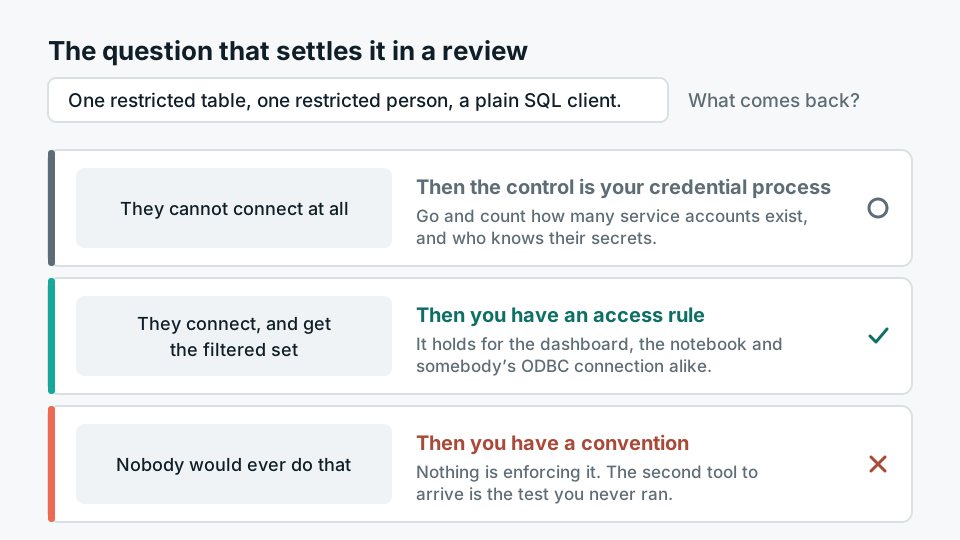
When this comes up in a review, the question that settles it is short. Take one restricted table and one restricted person, and ask what happens if that person connects to the warehouse with a plain SQL client and selects everything. If the answer is that they cannot connect, then the control is your credential process, and you should go and look at how many service accounts exist and who knows their secrets. If the answer is that they connect and get the filtered set, you have an access rule. If the answer is that nobody would do that, you do not have an access rule, you have a convention.
This is the reason we put governance on the query path in Antvia rather than in the reporting layer above it: the same masking and the same row filters apply whether the client is a dashboard, a notebook or somebody's ODBC connection, because the rule is attached to the table and not to the tool. It is a less exciting place to put a feature. It is the only place where the answer to the audit question stays true after the second tool arrives.