Reading change data out of Postgres without slowing the application down
Logical replication looks free until a slot stops being consumed and the write-ahead log quietly fills the disk on your primary.
The call tends to come at the weekend. Disk on the primary database is filling, nobody has deployed anything, write volume looks ordinary, and the free-space graph has been sloping downward since some point on Thursday. The application team is certain they changed nothing, and they are right.
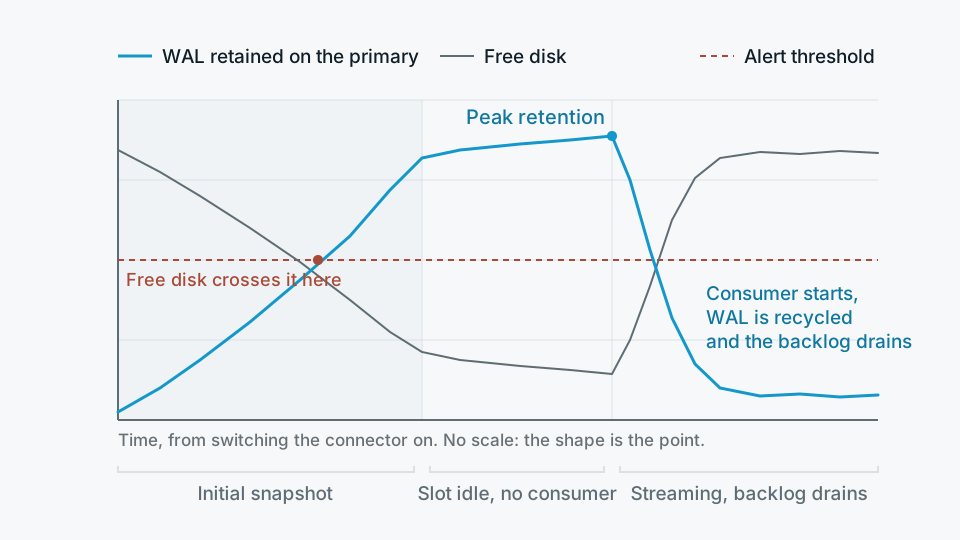
What changed was in the data platform. Someone paused a connector to debug a schema mismatch, or a destination warehouse rejected a batch and the ingestion job went into a retry loop that never succeeded. The replication slot on Postgres stopped being consumed. Postgres, being well behaved, kept every byte of write-ahead log that the slot might still need. Days of accumulated WAL is not a rounding error on a busy transactional database.
Change data capture from Postgres is a good default for getting operational data into a warehouse. It is low latency, it catches deletes, and it does not require the application team to add anything to their tables. It is also the ingestion pattern most likely to take production down, and almost always for reasons that have nothing to do with steady-state throughput. Worth holding the mechanics in your head before you turn it on.
What logical replication actually does to your primary
With wal_level set to logical, Postgres writes enough information into the WAL for a decoding plugin to reconstruct row-level changes. You create a publication naming the tables you care about, a consumer creates a replication slot, and the slot becomes a bookmark: the position in the WAL that this consumer has confirmed it has processed. Postgres will not recycle WAL segments ahead of the oldest slot's position.
The steady-state cost is modest. Decoding is CPU work on the primary, and it competes with query workload, but on most databases it is not what hurts you. Two other things are.
The first is disk. If the slot stalls, WAL accumulates until the volume is full, at which point Postgres cannot write and your application stops. The second is subtler and catches more people out: an inactive slot also holds back the catalog xmin horizon, so autovacuum cannot clean up dead tuples in the affected tables. You get bloat and degrading query plans days before you get a disk alert, and the connection between the two is not obvious to whoever is on call.
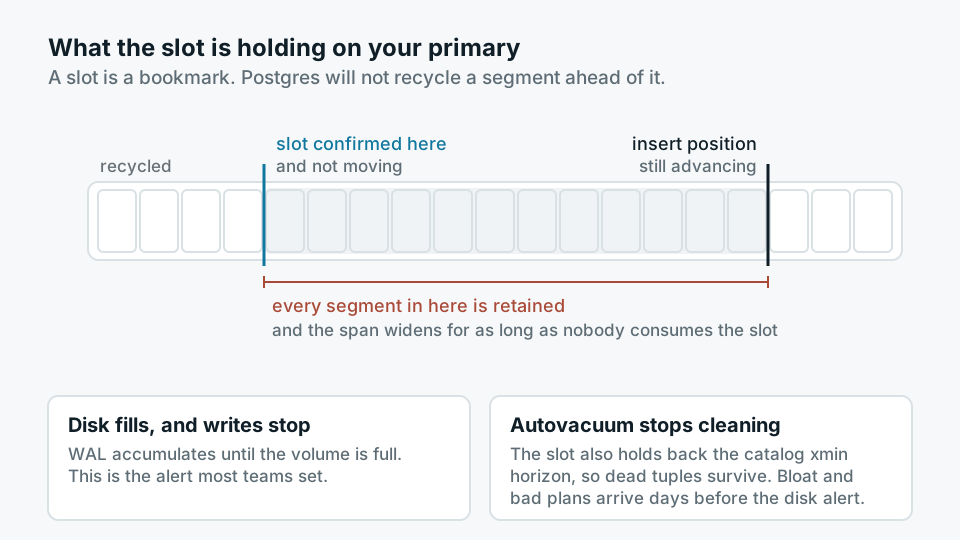
A replication slot is a promise to retain every byte of WAL until someone reads it, and Postgres keeps that promise even while it is being killed by it.
The pattern, stated plainly
The first backfill is the dangerous part, not the steady state
Most teams size their thinking around ongoing change volume, which for a typical transactional database is manageable. The risk sits in the initial snapshot. Before a stream is useful you have to load the existing rows, and while that snapshot runs the slot exists and is not advancing. So the question is not how much WAL your database generates per hour, it is how much it generates over the entire duration of your first backfill, plus enough headroom for that backfill to fail once and be retried.
On a large table this is where you discover that your biggest table dwarfs your daily change volume, that the snapshot query holds a long transaction which blocks vacuum on its own account, and that your staging environment told you nothing useful because it holds a fraction of the data.
- Snapshot then stream, single job The simplest option and the one most connectors default to. Fine for small tables. On large ones it maximises the window during which the slot is stalled.
- Create the slot, load separately Create the replication slot first so no changes are lost, then load the historical rows from a dump or a read replica out of band, then start consuming the slot. More moving parts, far less time with an unconsumed slot on the primary.
- Chunked backfill with checkpointing Break the historical load into keyed ranges that can resume. What matters is that a failure most of the way through does not send you back to zero while WAL keeps piling up.
- Backfill only what you need Two years of history is often a want rather than a requirement. Loading the last ninety days first, and the rest later on a quiet weekend, removes most of the risk from day one.
What to monitor, and what to page on
Connector dashboards tell you about the connector. They do not tell you what the database is holding on its behalf, which is the thing that will hurt you. Monitor the database side, from the database.
- Slot retained bytes The WAL distance between the current insert position and each slot's confirmed position, from pg_replication_slots. Alert on absolute size relative to your disk headroom, not on a percentage of anything.
- Slot active flag and wal_status An inactive slot on a live pipeline is an incident in progress. A wal_status that has moved past reserved means you are already into your safety margin.
- Oldest transaction and catalog xmin age This is your early warning for the bloat problem, and it fires before the disk one.
- Destination freshness Rows landed per table per hour at the warehouse end. A pipeline can be consuming WAL happily and still be writing nothing useful downstream.
Set max_slot_wal_keep_size. It lets Postgres invalidate a slot rather than fill the disk, which converts an outage into a re-snapshot. That is a real cost and a genuinely annoying afternoon, but it is a decision you should make deliberately in advance rather than at two in the morning. Choose the value with your actual disk headroom and your longest plausible unattended weekend in mind.
Failover will surprise you
High availability and logical slots have historically not got along. A physical standby promoted after a primary failure did not carry the logical replication slots with it, so a failover that the application barely noticed would silently destroy your CDC position and require a full re-snapshot. Recent Postgres versions have made this considerably better with logical decoding on standbys and slot synchronisation, but whether you actually have it depends on your version and, on managed platforms, on what the provider has enabled. Find out which of those two worlds you are in before you design around it, and test it by triggering a failover rather than by reading the documentation.
Two related details worth checking at the same time. Logical replication does not carry DDL, so an ALTER TABLE upstream arrives at your warehouse as a column that quietly stops being populated or as a hard failure, depending on your tooling. And tables without a primary key need REPLICA IDENTITY FULL for updates and deletes to be usable, which writes the entire old row into the WAL on every change. Turning that on across a wide, frequently updated table can multiply your WAL volume in a way nobody predicted in the design review.
When CDC is the wrong answer
Plenty of pipelines that run logical replication do not need it. If the table has a reliable updated_at maintained by the application or a trigger, if rows are never hard-deleted, and if the business is content with data that is fifteen minutes or an hour old, then a timestamp-based incremental pull against a read replica is the better engineering choice. It touches the primary not at all, it fails safely because a missed run just picks up more rows next time, and any analyst on the team can reason about it at three in the morning.
The honest limits of that approach are worth stating. It cannot see hard deletes, so you either need soft deletes or a periodic reconciliation pass. It misses intermediate states when a row changes twice between pulls, which matters for event-shaped tables and rarely matters for reference data. And it depends on updated_at actually being updated on every write path, including the bulk scripts nobody remembers, which is a claim to verify rather than accept.
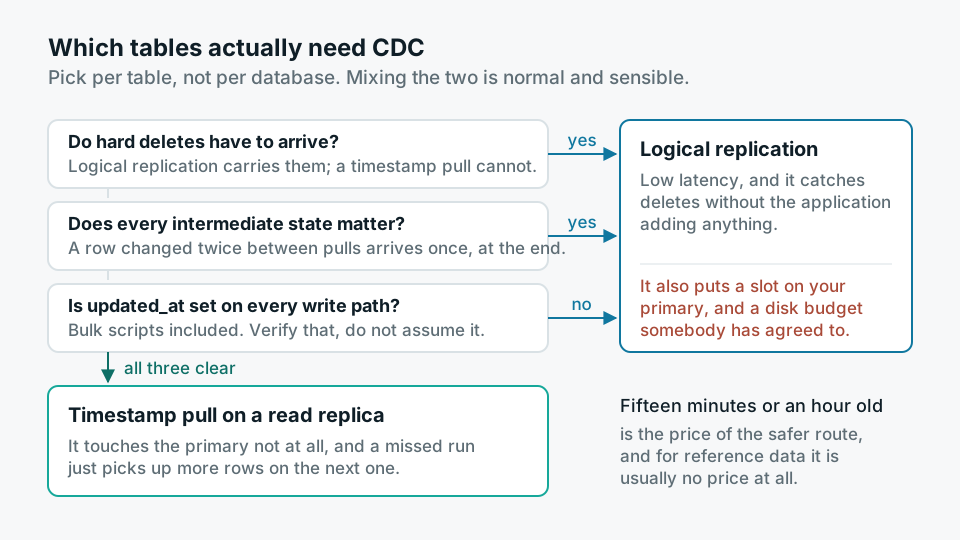
- 01Pick per table, not per databaseCDC for the handful of tables that need deletes and low latency. Timestamp pulls on a replica for the rest. Mixing the two is normal and sensible.
- 02Agree the disk budget with whoever runs the databaseBefore creating a slot, write down the headroom, the alert thresholds, and the max_slot_wal_keep_size value. Get the DBA or platform owner to agree it.
- 03Backfill deliberatelyCreate the slot, load history out of band, then start streaming. Measure peak WAL retention during that window and keep the number.
- 04Break it on purposeStop the connector for an hour in a non-production environment and watch the slot metrics move. Trigger a failover and see whether the slot survives. Rehearse the re-snapshot.
None of this is exotic. It is the ordinary discipline of running a pipeline that has a foot in someone else's production database, and the reason it gets skipped is that logical replication is genuinely easy to switch on. The setup takes an afternoon. The failure arrives weeks later, on the primary, on a Saturday, and lands on a team that did not know the slot existed.